
Platform Overview, Roles & Universal Account Onboarding
End-to-end standard operating procedures for guest marketplace discovery, single-role registration (/auth/signup), dual-channel OTP/magic-link verification (/auth/verify-account), secure session-conflict sign-in (/auth/signin), and self-service password recovery.
All Stakeholders, QA Engineers, Onboarding Leads & Partners
https://gigjobsindia.com/
http://gjiadmin.netlify.app/
Strict Single-Role Account Policy (AUTH-01)
Every GJI user account is strictly bound to one canonical role (candidate, employer, or customer). Any legacy multi-role record is normalized on hydration and API sign-in to its primary role. Separate email IDs are required to operate across multiple personas.
Payment Gateway & SMS Sandbox Notice (ARC-01)
Paid subscription checkout is queued pending final merchant onboarding with HDFC Bank and PhonePe. Mobile OTP operates in sandbox mode via "Use Simulated Code (123456)" while telecom DLT routes finalize.
1. End-to-End Architecture & Process Flowchart
Click the diagram below to inspect full resolution in lightbox view.
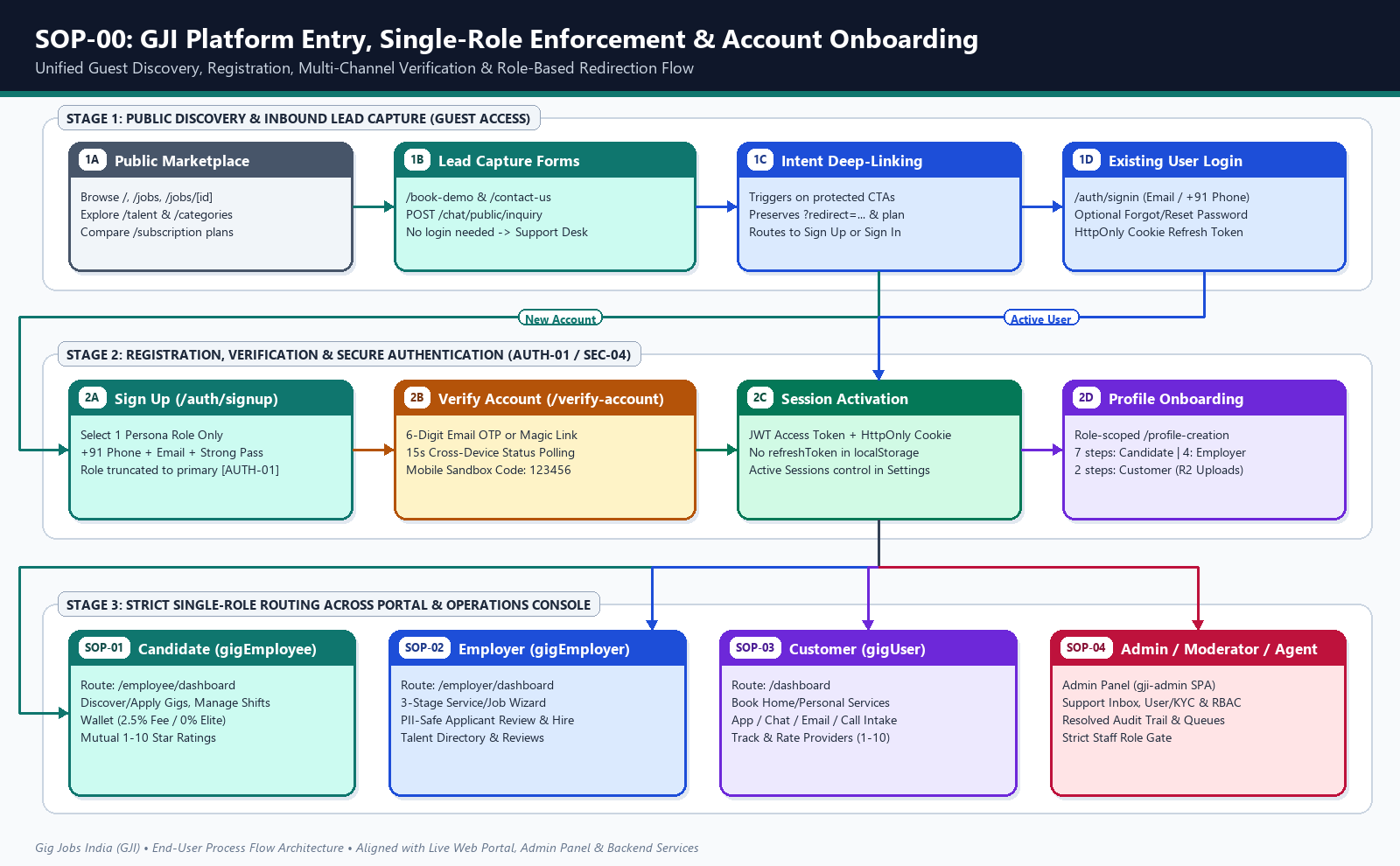
Figure 0.1 — Universal Account Lifecycle, Single-Role Enforcement (AUTH-01) & Dashboard Routing
2. Verified Role Test Credentials (Sandbox / QA)
Single-role policy (AUTH-01) enforced across every account. Mobile SMS verification uses sandbox code 123456.
| Persona Role | Email (Click to Copy) | Password (Click to Copy) | Wallet | Operational Scope |
|---|---|---|---|---|
| Candidate (Gig Worker) | ₹5,000.00 | 7-step KYC profile, gig applications, shift attendance, UPI/NEFT payouts | ||
| Employer (Business) | ₹25,000.00 | 3-stage request wizard, applicant screening/approval, timesheets & reviews | ||
| Customer (Client) | ₹10,000.00 | On-demand service bookings, saved pincode locations, direct chat & ratings | ||
| Operations Admin (Staff) | N/A | Admin portal perimeter gate, KYC moderation, RBAC, ledger & support inbox |
3. Detailed Click-by-Click Operating Procedures
Public Portal Discovery & Guest Funnel
Visitors evaluate jobs, verified talent previews, and transparent tier pricing before registering. Unauthenticated protected actions preserve ?redirect= parameters seamlessly.
| # | User Action | UI Component / Control | Input / Validation Rule | Expected System Response |
|---|---|---|---|---|
| 1 | Open web portal homepage | Browser URL (https://gigjobsindia.com/) | Public unauthenticated access | Loads Hero search (Job + Zipcode), Top Navigation (Find Jobs, Find Talent, Businesses, Households, Pricing, About Us, Contact Us), Post Job, and Login. |
| 2 | Inspect pricing tiers without login barrier | Header -> Pricing (/subscription) | Switch Professionals / Businesses / Households pills | Displays Standard/Pro/Elite plans, fees (0% withdrawal fee on Elite), and 18% GST note. |
| 3 | Submit sales or support lead | Contact Us (/contact-us) or Book Demo (/book-demo) | Name, Email, Message or Business inquiry | Submits via POST /api/chat/public/inquiry (BIZ-01) directly into Admin Live Support Inbox. |
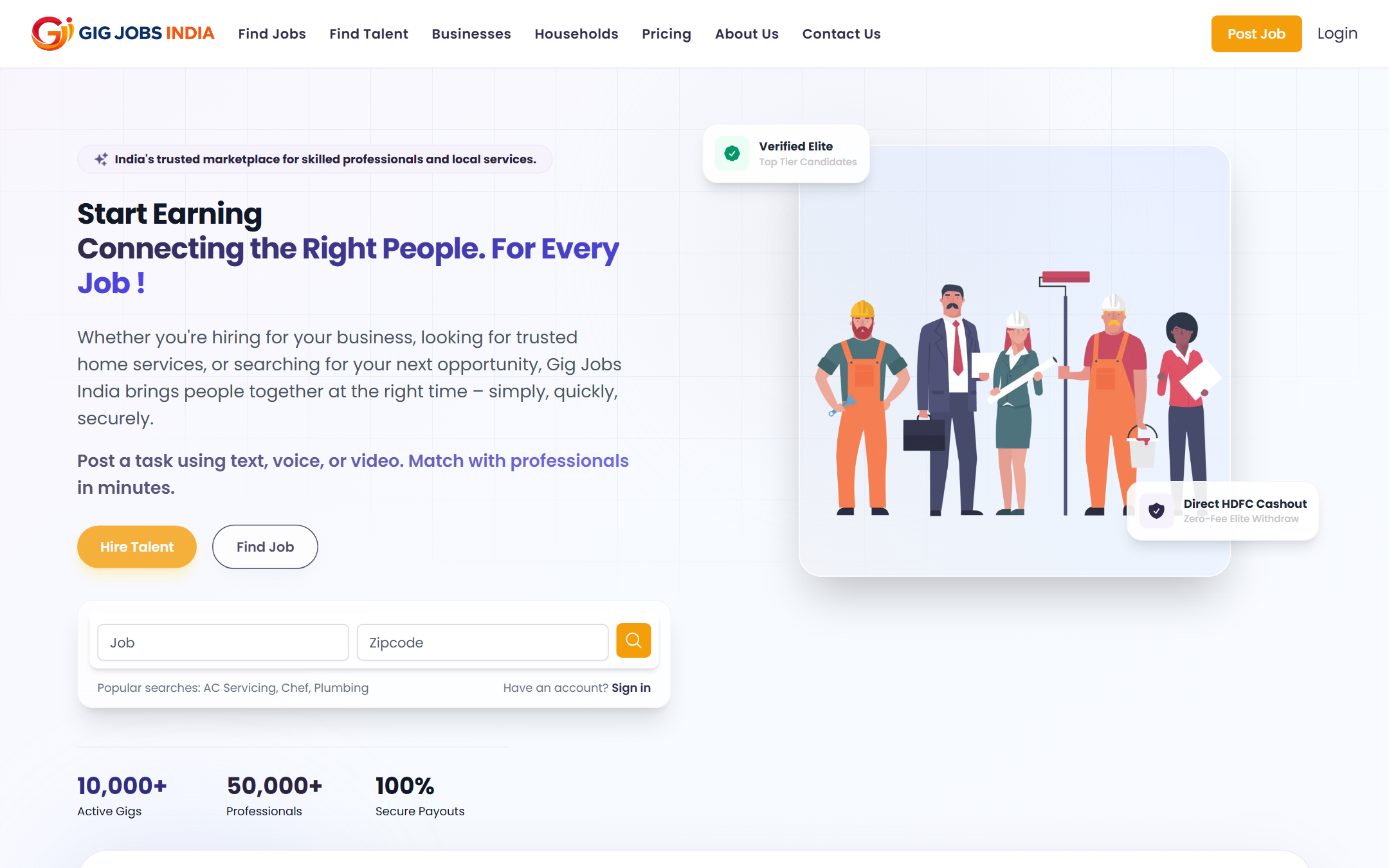
Figure 0.2 — Live Web Portal Home & Search Funnel (https://gigjobsindia.com/)
Universal User Registration & Role Selection
Registers a single-role marketplace account with strict +91 phone formatting, lowercase email normalization, and password strength validation.
| # | User Action | UI Component / Control | Input / Validation Rule | Expected System Response |
|---|---|---|---|---|
| 1 | Open Registration screen | Top segmented toggle -> "Sign up" (/auth/signup) | Ensure "Sign up" tab is active | Displays Create a Free Account card with AUTH-01 single-role notice and progress rail ("Your Details"). |
| 2 | Select primary account role | Role <select> dropdown ("Select a role") | Choose Candidate, Employer, or Customer (Admin hidden on UI) | Binds single role field in RegisterDto. |
| 3 | Enter 10-digit Indian mobile number | Phone * input field | Enter 10 digits (e.g. 9800000001) | Automatically strips non-digits and prepends +91 country prefix. |
| 4 | Enter email and strong password | Email *, Password, Confirm Password inputs | Min 8 chars: uppercase, lowercase, digit & special char (@$!%*?&) | Shows green checkmark when Password and Confirm Password match. |
| 5 | Submit registration | Orange "Continue" button | All validations pass | Calls POST /api/auth/register, stores pendingRegistration context in localStorage, sends Email OTP + Magic Link via BullMQ, and redirects to /auth/verify-account. |
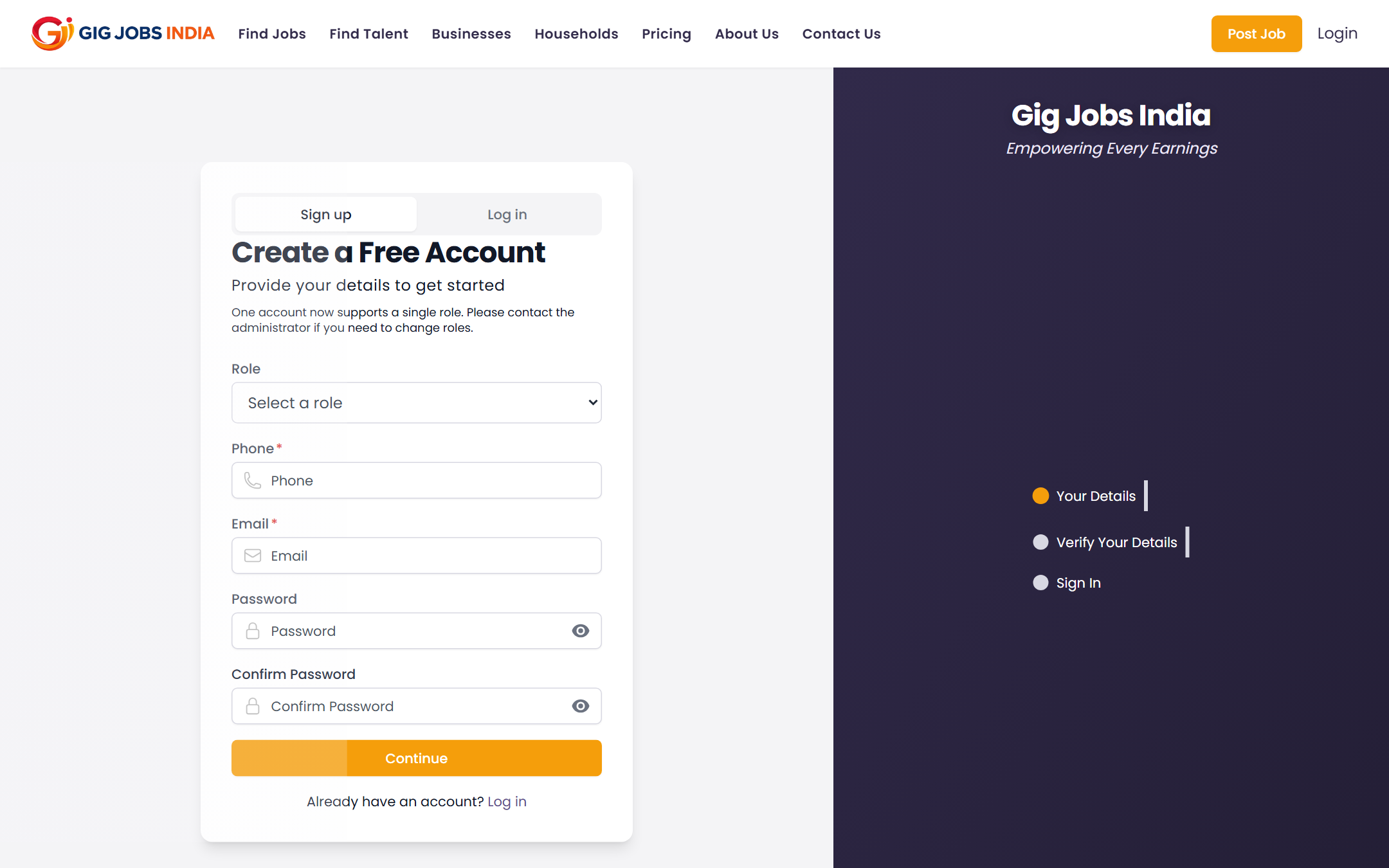
Figure 0.3 — Universal Account Signup Form with Single-Role Dropdown (/auth/signup)
Dual-Factor Account Verification & OTP Challenge
Confirms both Mobile SMS OTP (sandbox 123456) and Email 6-digit OTP or single-use Magic Link token.
| # | User Action | UI Component / Control | Input / Validation Rule | Expected System Response |
|---|---|---|---|---|
| 1 | Populate Mobile OTP in sandbox mode | "Use Simulated Code (123456)" link or 6-digit Mobile OTP boxes | Click helper link or type 1 2 3 4 5 6 | Fills the 6 Mobile OTP digit cells cleanly (60s resend cooldown when triggered). |
| 2 | Enter Email 6-digit OTP or click Magic Link | Email OTP 6-digit boxes or "Check now" button | Enter Redis-backed 6-digit code from inbox (10-min TTL) | 15-second poller (GET /api/auth/verification-status) also auto-detects cross-device Magic Link verification. |
| 3 | Finalize account activation | Orange "Verify Account" button | Both 6-digit OTPs filled | Calls POST /api/auth/verify-otp, sets status to active, clears pendingRegistration, and redirects to /auth/signin. |
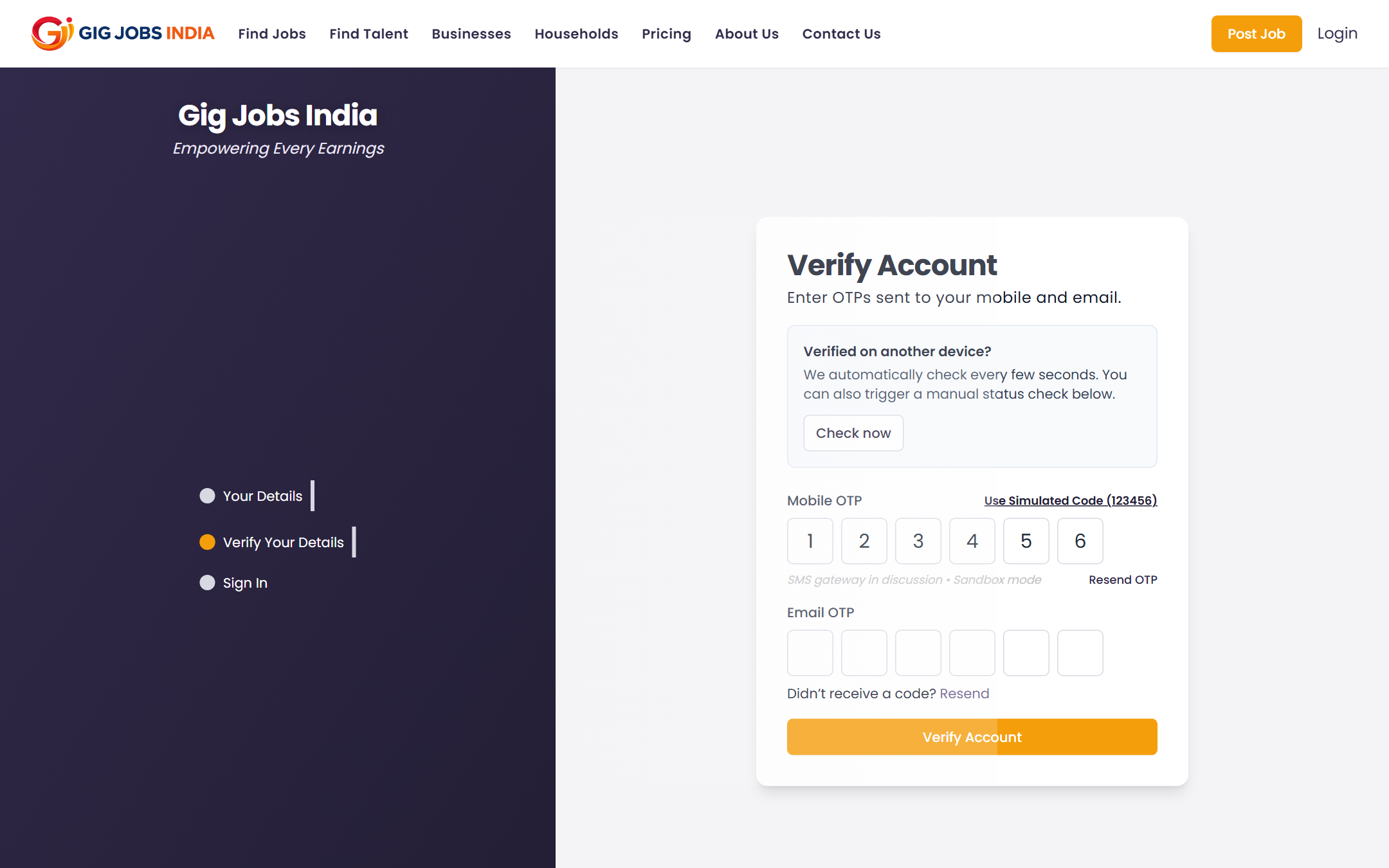
Figure 0.4 — Dual-Factor Account Verification Screen (/auth/verify-account)
Secure Sign-In, Session Conflict Takeover & Role Routing
Authenticates user via JWT + httpOnly refresh cookies (SEC-04), resolves single-device session conflicts, and routes users to their role dashboard.
| # | User Action | UI Component / Control | Input / Validation Rule | Expected System Response |
|---|---|---|---|---|
| 1 | Enter registered Email & Password | Email * & Password * inputs + optional Remember Me | Normalized lowercase email + password | Submits POST /api/auth/login with credentials: include. |
| 2 | Resolve Active Session Detected modal (if prompted) | Session Conflict Dialog -> "Proceed" or "Cancel" | Triggered on HTTP 409 SESSION_CONFLICT if logged in elsewhere | Clicking "Proceed" sets forceLogoutPreviousSession: true, invalidating old device tokens. |
| 3 | Automatic Role-Based Redirect | AuthContext navigateToDashboard() | mapRoleKey single-role resolution | candidate -> /employee/dashboard, employer -> /employer/dashboard, customer -> /dashboard. |
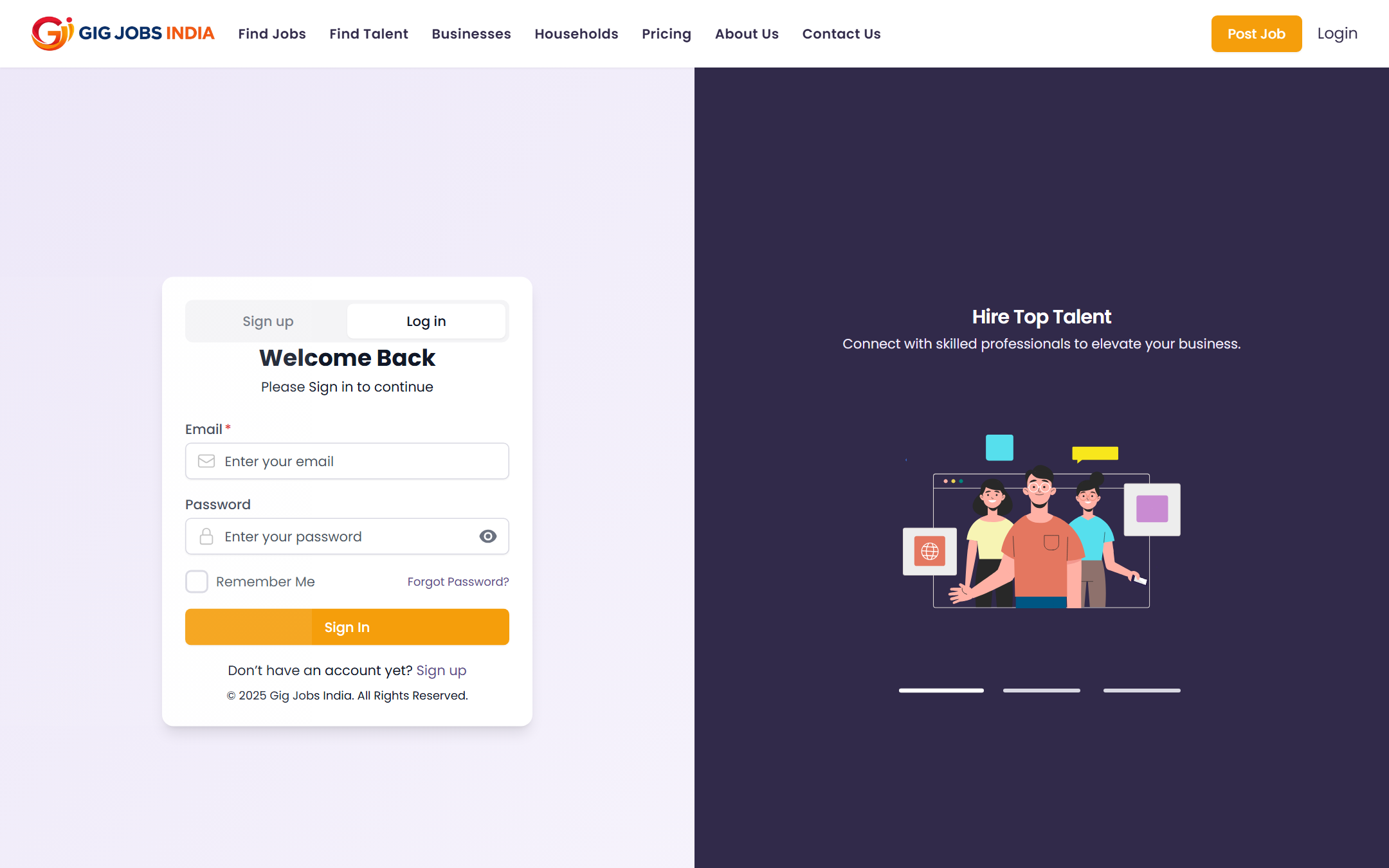
Figure 0.5 — Secure Sign-In Screen (/auth/signin)
Self-Service Password Recovery
Dispatches a 10-minute reset code via email queue and transitions to /auth/reset-password without leaking account existence.
| # | User Action | UI Component / Control | Input / Validation Rule | Expected System Response |
|---|---|---|---|---|
| 1 | Navigate from Sign In | "Forgot Password?" link on /auth/signin | Click link | Transitions to /auth/forgot-password. |
| 2 | Request reset code | Email * input + "Send Reset Code" button | Registered account email (60s cooldown) | Triggers AuthService.forgotPassword, shows generic confirmation banner, and routes to /auth/reset-password. |
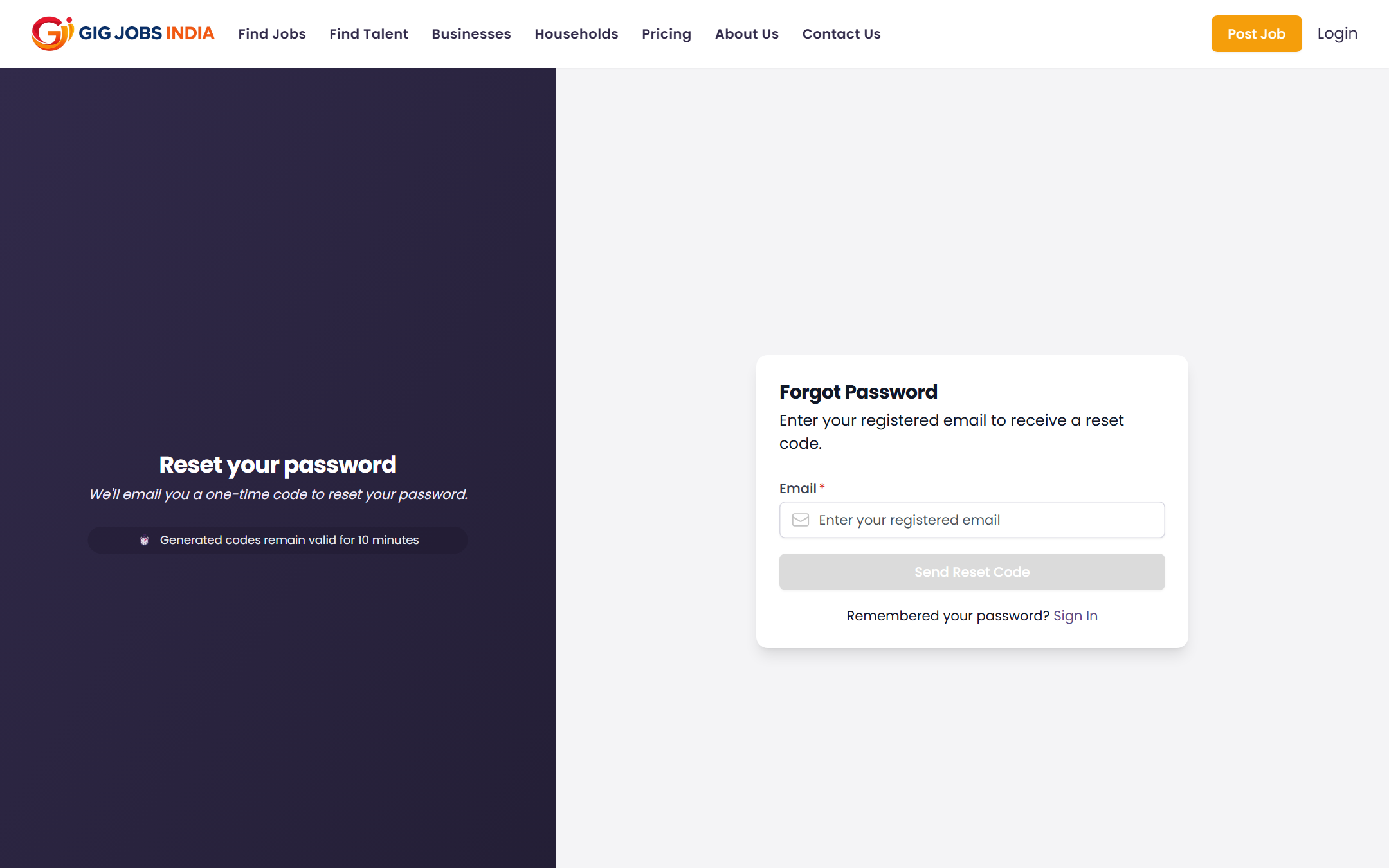
Figure 0.6 — Self-Service Password Recovery (/auth/forgot-password)