
Candidate (Gig Employee) End-to-End Operational Guide
Complete click-by-click instructions for Candidates to complete 7-step KYC onboarding, browse and apply to matching shifts, manage active gigs and attendance telemetry, chat with hirers, and withdraw wallet earnings.
Gig Workers, Skilled Tradespeople, Support Coordinators & QA
https://gigjobsindia.com/
http://gjiadmin.netlify.app/
Candidate Single-Role Boundary (AUTH-01)
Accounts holding candidate / gigEmployee role access Find Gigs, My Gigs, 7-step onboarding, Wallet, Messages, and Reviews. Requesting services as an Employer requires a separate Employer account.
Zero-Fee Elite Cashout vs. 2.5% Standard Convenience Fee
Standard and Pro Partners pay a 2.5% withdrawal fee on UPI/Bank payouts; Elite Partners (₹699/mo) enjoy 0% withdrawal fee plus 1% NPS bonus when on-time completion exceeds 85%.
1. End-to-End Architecture & Process Flowchart
Click the diagram below to inspect full resolution in lightbox view.
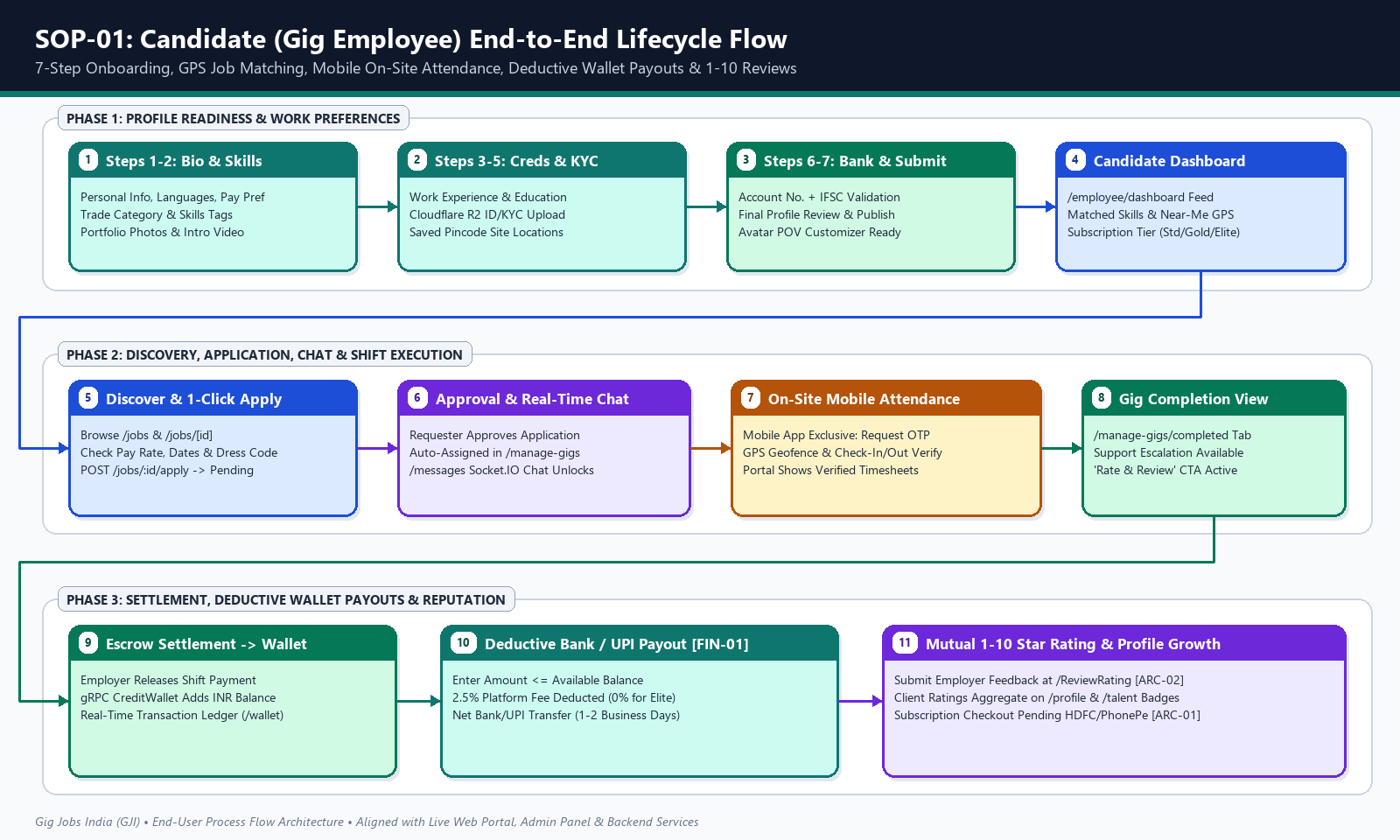
Figure 1.1 — Candidate End-to-End Lifecycle from Profile Creation to Wallet Payout
2. Verified Role Test Credentials (Sandbox / QA)
Single-role policy (AUTH-01) enforced across every account. Mobile SMS verification uses sandbox code 123456.
| Persona Role | Email (Click to Copy) | Password (Click to Copy) | Wallet | Operational Scope |
|---|---|---|---|---|
| Candidate (Gig Worker) | ₹5,000.00 | 7-step KYC profile, gig applications, shift attendance, UPI/NEFT payouts | ||
| Employer (Business) | ₹25,000.00 | 3-stage request wizard, applicant screening/approval, timesheets & reviews | ||
| Customer (Client) | ₹10,000.00 | On-demand service bookings, saved pincode locations, direct chat & ratings | ||
| Operations Admin (Staff) | N/A | Admin portal perimeter gate, KYC moderation, RBAC, ledger & support inbox |
3. Detailed Click-by-Click Operating Procedures
Candidate Command Dashboard & Top Navigation
Monitors Assigned Jobs, Ongoing Gigs, Completed Gigs, Monthly Earnings, Applied Jobs, and geo-matched Available Jobs Near You.
| # | User Action | UI Component / Control | Input / Validation Rule | Expected System Response |
|---|---|---|---|---|
| 1 | Sign in with candidate test credentials | /auth/signin -> "Sign In" | test.candidate@gigjobsindia.com / GjiTest#2026Candidate! | Hydrates GigEmployeeTopNavigation (Home, Find Gigs, My Gigs, Wallet, Messages, Settings) and loads /employee/dashboard. |
| 2 | Review live KPI summary & match feeds | Dashboard KPI Strip + Applied / Recommended / Available Cards | Read-only metrics + 1-click Apply actions | Displays shift counts and tailored matches filtered by saved pincode/city and work preferences. |
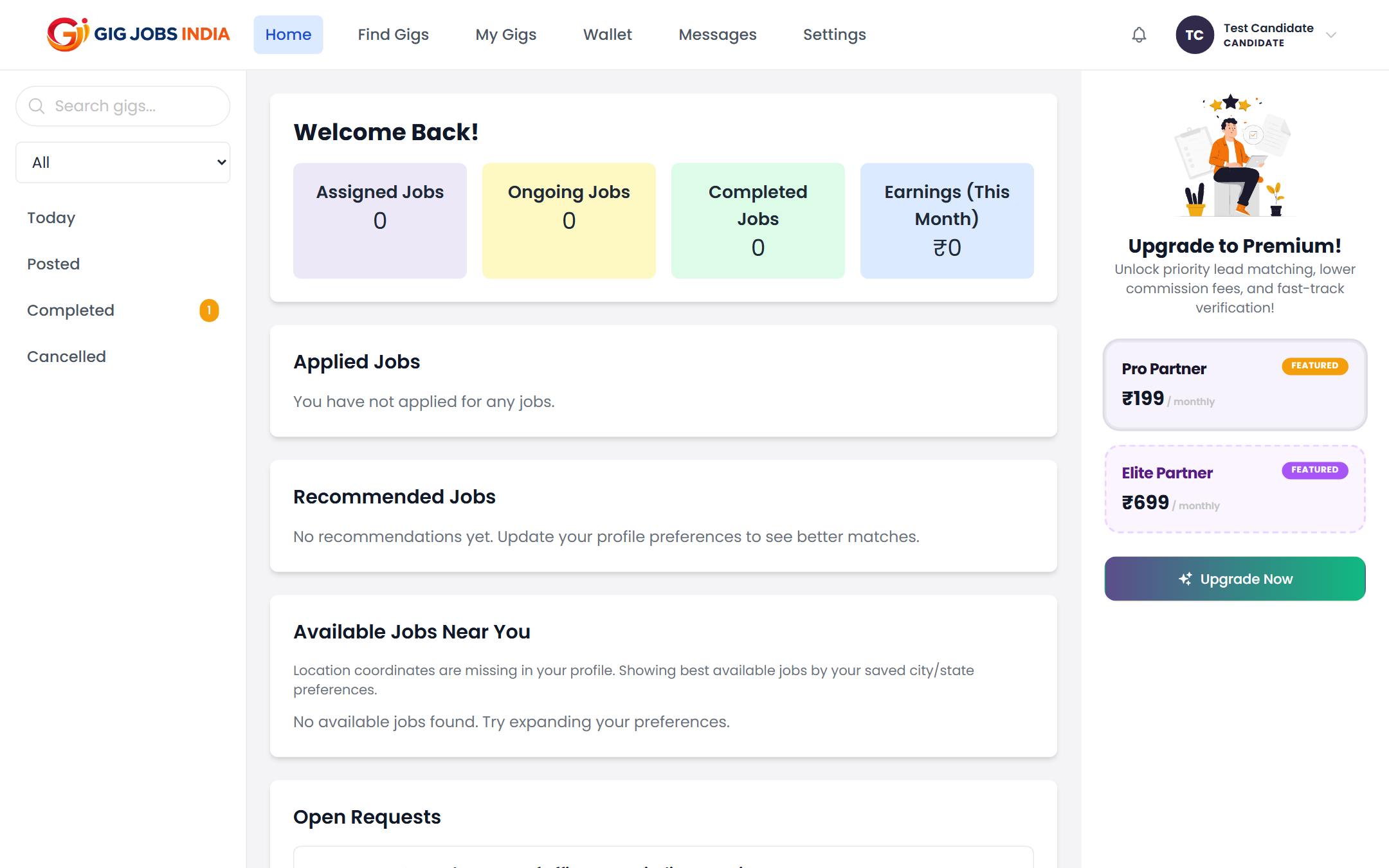
Figure 1.2 — Candidate Dashboard (/employee/dashboard)
7-Step Profile Creation & KYC Onboarding Wizard
Builds complete verified worker credentials across 7 persistent steps stored in candidate_profiles with R2 presigned uploads.
| # | User Action | UI Component / Control | Input / Validation Rule | Expected System Response |
|---|---|---|---|---|
| 1 | Step 1 — Basic Details & Address | First/Last Name, Date of Birth (Year/Month/Day 18+), Gender, Pincode | Validates age >= 18 and auto-populates City/State from Pincode lookup | Saves Step 1 draft and enables "Next" button to Step 2. |
| 2 | Steps 2 to 4 — Skills, Experience & Education | Category tree, work images/video, experience & training certs | Uploads transfer via POST /api/uploads/presign to Cloudflare R2 | Attaches CDN asset URLs directly into candidate JSONB profile. |
| 3 | Steps 5 to 7 — KYC ID, Bank IFSC & Summary | Photo ID upload, Emergency Contact, IFSC/Account No, Final Submit | Validates IFSC bank branch and required Aadhaar/PAN proof | Publishes verified candidate profile and enables applications across /jobs. |
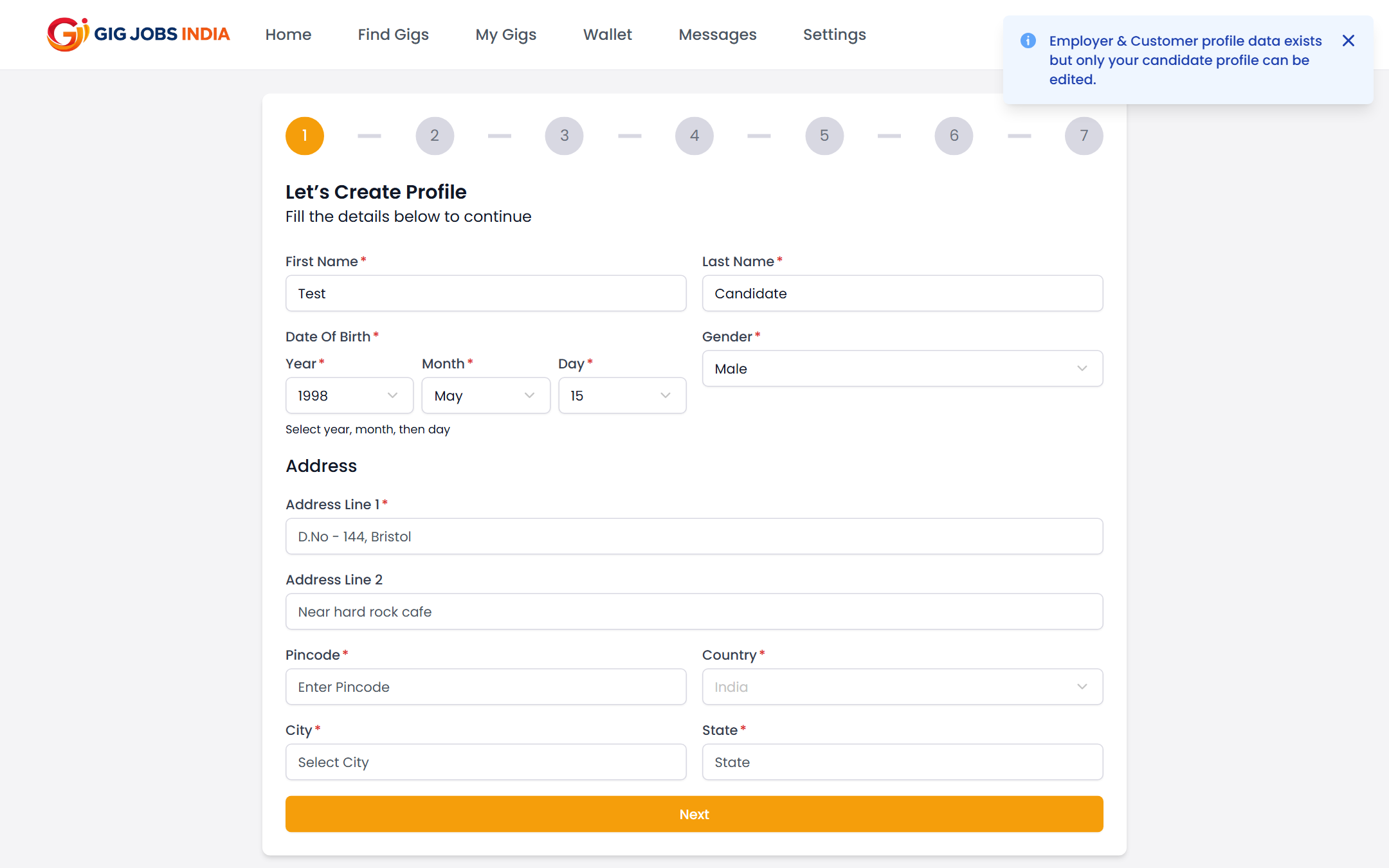
Figure 1.3 — 7-Step Candidate Profile Creation & KYC Wizard (/profile-creation)
Gig Discovery, Filtering & 1-Click Job Application
Searches open listings by role keyword, city/pincode, category pill, schedule type, and pay sort before submitting applications.
| # | User Action | UI Component / Control | Input / Validation Rule | Expected System Response |
|---|---|---|---|---|
| 1 | Open Find Gigs catalog | Top Nav -> "Find Gigs" (/jobs) | Fetches public active feed (GET /api/jobs/feed) | Renders job cards with category chip, open spots, location, and pay rate. |
| 2 | Filter & inspect gig details | Keyword input, City/Pincode box, Category pills, "Filter" button | Filter by e.g. Hospitality or Hyderabad | Narrows list live and displays pay budget and shift window. |
| 3 | Submit job application | "Apply Now" -> Application Confirmation Modal | Optional cover note + expected pay -> Submit | Calls POST /api/jobs/[id]/apply and marks job card as Applied. |
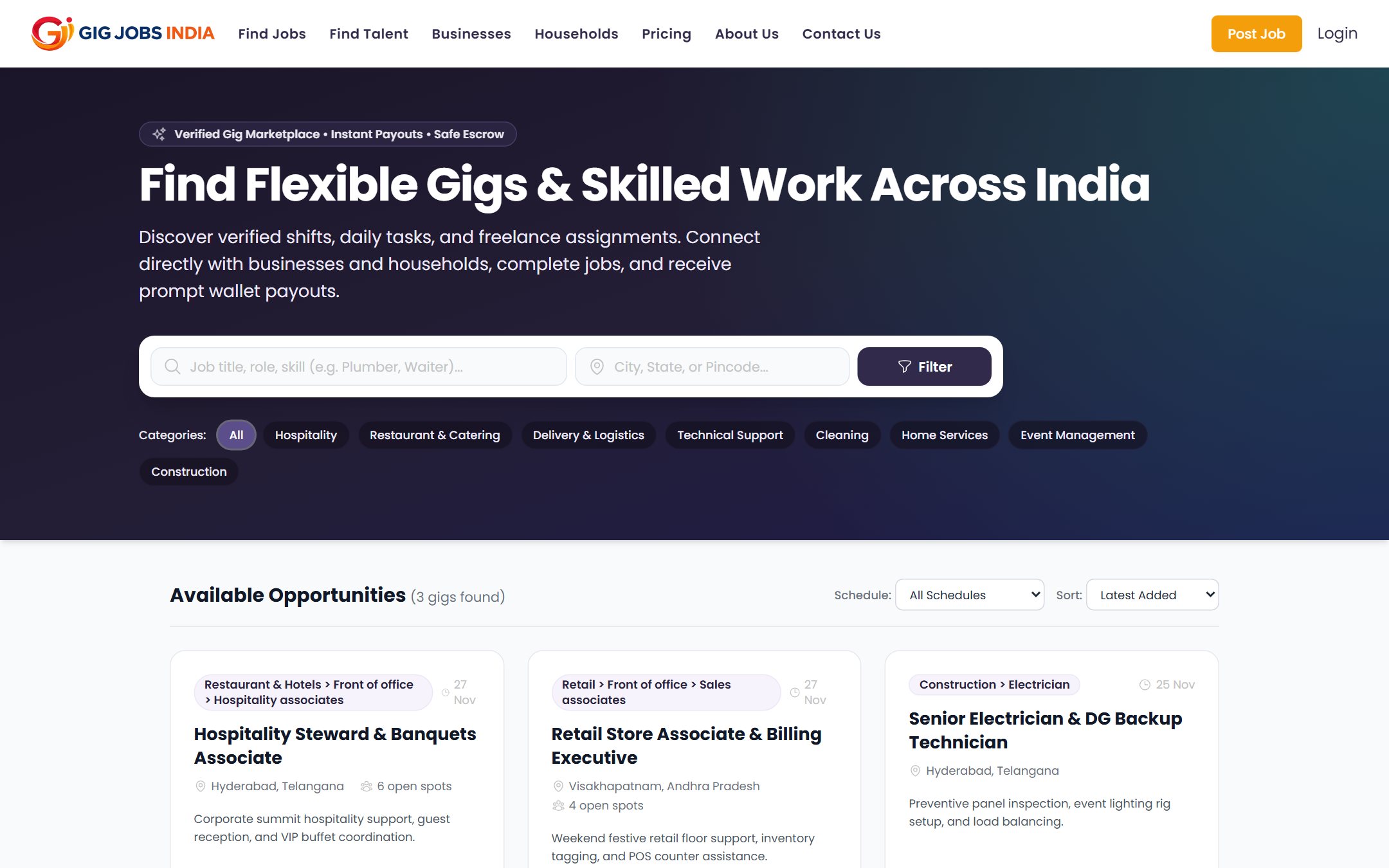
Figure 1.4 — Public & Candidate Gig Discovery Catalog (/jobs)
Daily Shift Tracking & Attendance Verification
Tracks Today, Posted, Completed, and Cancelled shifts alongside AttendanceInsightsCard check-in timestamps and geo-fence logs.
| # | User Action | UI Component / Control | Input / Validation Rule | Expected System Response |
|---|---|---|---|---|
| 1 | Open My Gigs -> Today view | Top Nav -> "My Gigs" (/manage-gigs/today) | Lists shifts where today falls inside startDate–endDate | Renders assigned shift cards with status badge and View Details modal trigger. |
| 2 | Inspect Attendance & Timesheet card | DetailedGigCard -> AttendanceInsightsCard | On-site QR/OTP + 200m GPS check-in captured via GJI mobile app | Displays Check-In time, duration logged, and Verified/Checked-In badge. |
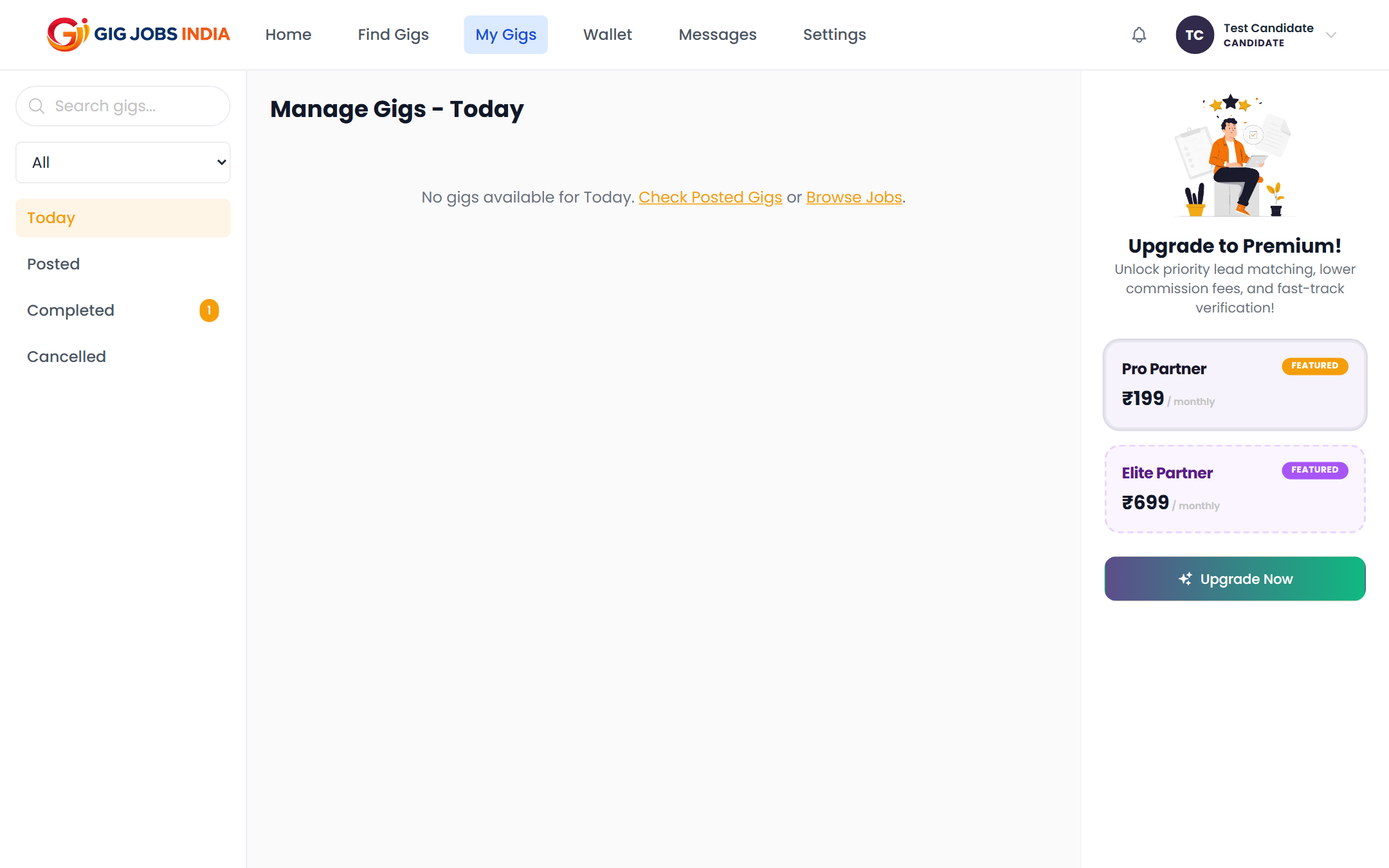
Figure 1.5 — Manage Gigs (Today) & Shift Tracking (/manage-gigs/today)
Digital Wallet, Fee Calculation & Payout Withdrawal
Displays current wallet balance, itemized payout credits/debits, subscription convenience fee rules, and UPI/NEFT withdrawal form.
| # | User Action | UI Component / Control | Input / Validation Rule | Expected System Response |
|---|---|---|---|---|
| 1 | Open Digital Wallet & Ledger | Top Nav -> "Wallet" (/wallet) | Loads balance and transaction ledger via GET /api/users/wallet/[email]/balance | Displays Available Balance card (e.g., ₹5,000.00) and transaction rows. |
| 2 | Initiate UPI or Bank Transfer withdrawal | "Withdraw Funds" CTA button | Enter amount, choose UPI ID or Bank Account/IFSC transfer | Computes 2.5% fee (0% for Elite Partner), debits balance, and queues payout within 24 hours. |
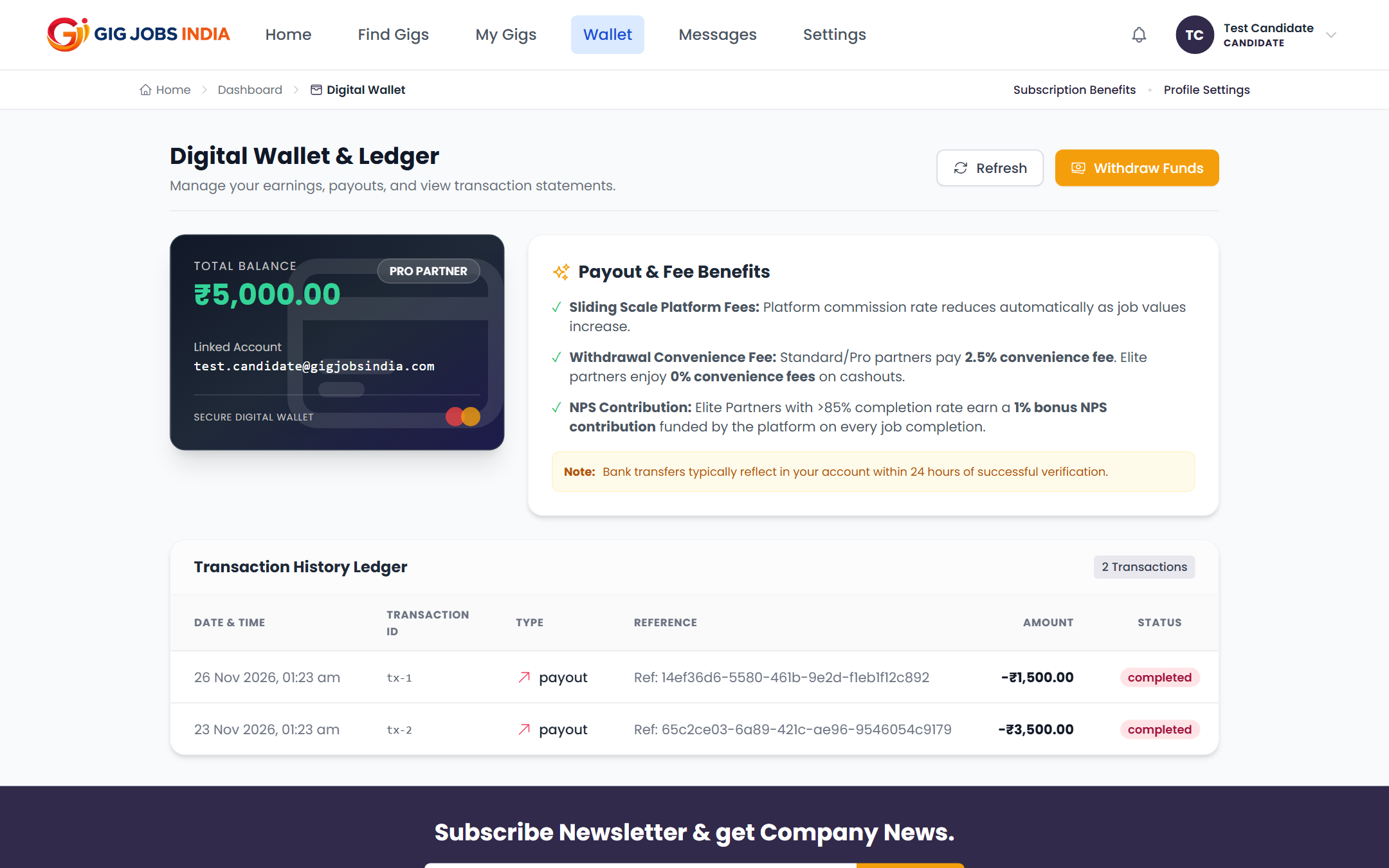
Figure 1.6 — Candidate Digital Wallet & Transaction Ledger (/wallet)
Real-Time Messaging & Post-Shift Rating
Direct WebSocket messaging unlocks automatically once a candidate application is approved by the employer.
| # | User Action | UI Component / Control | Input / Validation Rule | Expected System Response |
|---|---|---|---|---|
| 1 | Open Messages thread | Top Nav -> "Messages" (/messages) | Select active gig conversation thread | Displays arrival notes, attachments, and online presence indicators. |
| 2 | Rate requester after completion | /manage-gigs/completed -> "Review / Rate" (/ReviewRating) | Choose 1 to 10 stars + optional qualitative feedback -> Submit Review | Calls POST /api/jobs/reviews and updates mutual reputation score. |
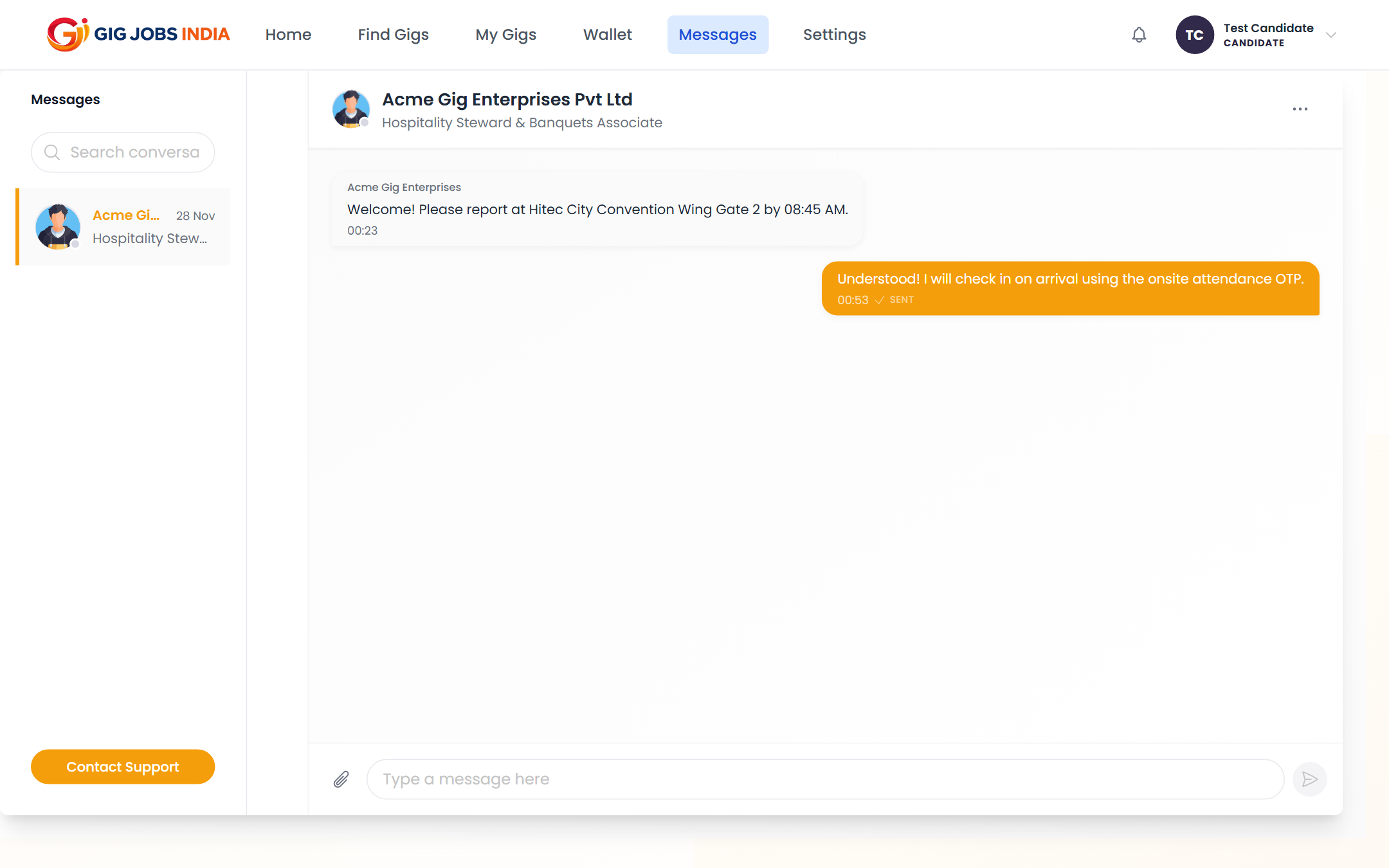
Figure 1.7 — Real-Time Messaging Hub (/messages)