
Employer & Business Portal Operational Standard
Step-by-step operations manual covering employer authentication, the 3-step Request Service wizard, PII-safe applicant screening and Approve/Reject hiring workflows, timesheet escrow release, and 1-to-10 star rating submission.
Corporate Hirers, SME Managers, Recruiters & Operations Staff
https://gigjobsindia.com/
http://gjiadmin.netlify.app/
Subscription Payment Gateway Notice (ARC-01)
Direct online checkout for Growth (₹1,499/mo) and Enterprise (₹4,999/mo) plans is pending final merchant integration with HDFC Bank & PhonePe. Pricing catalog and 18% GST calculations operate live; service escrow uses wallet/simulated reserves.
Strict Role Separation (AUTH-01)
Employer accounts cannot apply for candidate jobs. Company KYC/KYB verification uses a 4-step Employer onboarding flow under /profile-creation.
1. End-to-End Architecture & Process Flowchart
Click the diagram below to inspect full resolution in lightbox view.
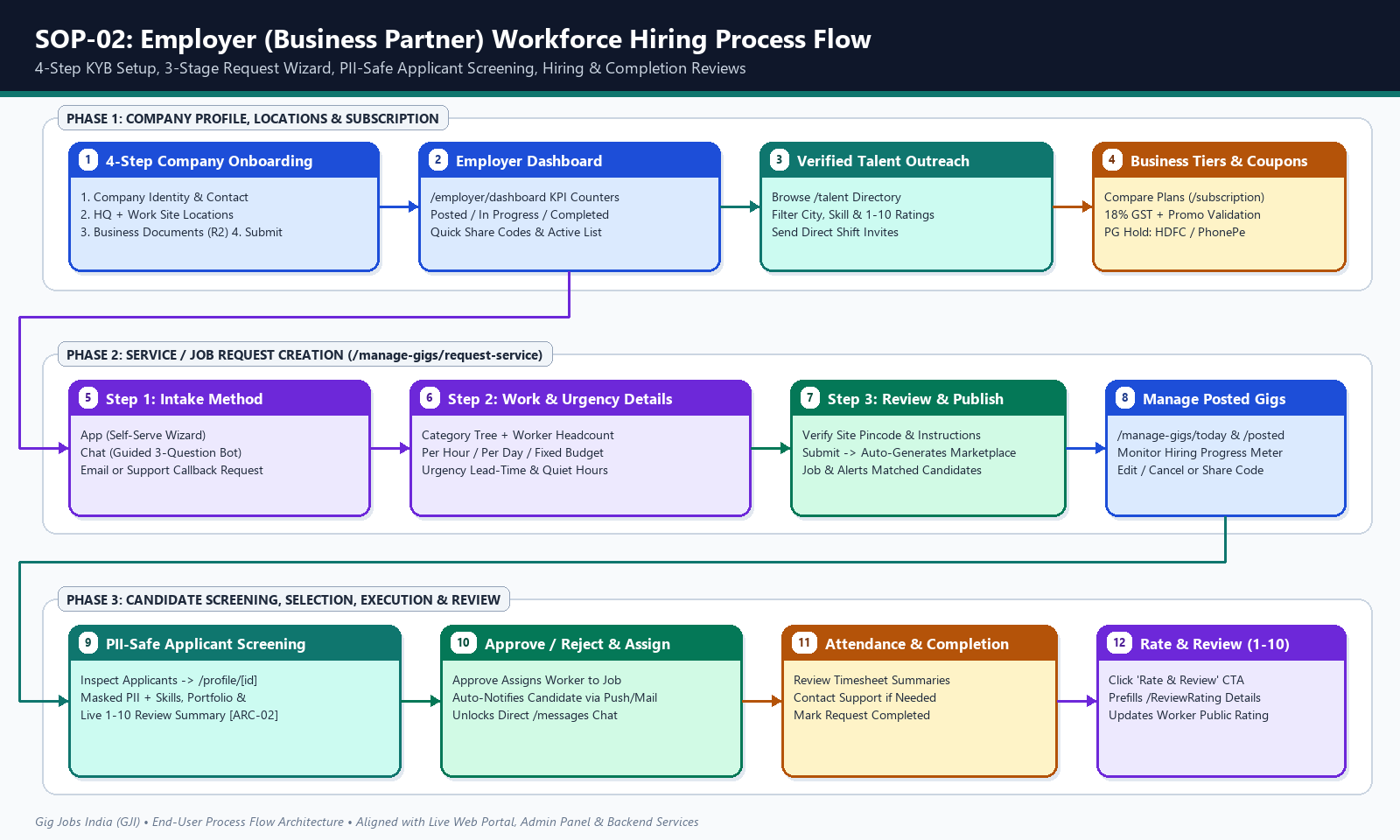
Figure 2.1 — Employer Operations Flow from Service Request to Escrow Release & Review
2. Verified Role Test Credentials (Sandbox / QA)
Single-role policy (AUTH-01) enforced across every account. Mobile SMS verification uses sandbox code 123456.
| Persona Role | Email (Click to Copy) | Password (Click to Copy) | Wallet | Operational Scope |
|---|---|---|---|---|
| Candidate (Gig Worker) | ₹5,000.00 | 7-step KYC profile, gig applications, shift attendance, UPI/NEFT payouts | ||
| Employer (Business) | ₹25,000.00 | 3-stage request wizard, applicant screening/approval, timesheets & reviews | ||
| Customer (Client) | ₹10,000.00 | On-demand service bookings, saved pincode locations, direct chat & ratings | ||
| Operations Admin (Staff) | N/A | Admin portal perimeter gate, KYC moderation, RBAC, ledger & support inbox |
3. Detailed Click-by-Click Operating Procedures
Employer Command Hub & Hiring Overview
Provides real-time visibility into Jobs Posted, In Progress shifts, Completed contracts, and Recent Job Requests with 1-click Request Service access.
| # | User Action | UI Component / Control | Input / Validation Rule | Expected System Response |
|---|---|---|---|---|
| 1 | Sign in with employer test credentials | /auth/signin -> "Sign In" | test.employer@gigjobsindia.com / GjiTest#2026Employer! | Loads GigEmployerTopNavigation (Home, Manage Gigs, Find Talent, Messages, Settings) and /employer/dashboard. |
| 2 | Monitor active postings and share codes | KPI summary strip + Recent Job Requests cards | Click Request Service bottom-left button to create a new shift | Opens /manage-gigs/request-service 3-step wizard. |
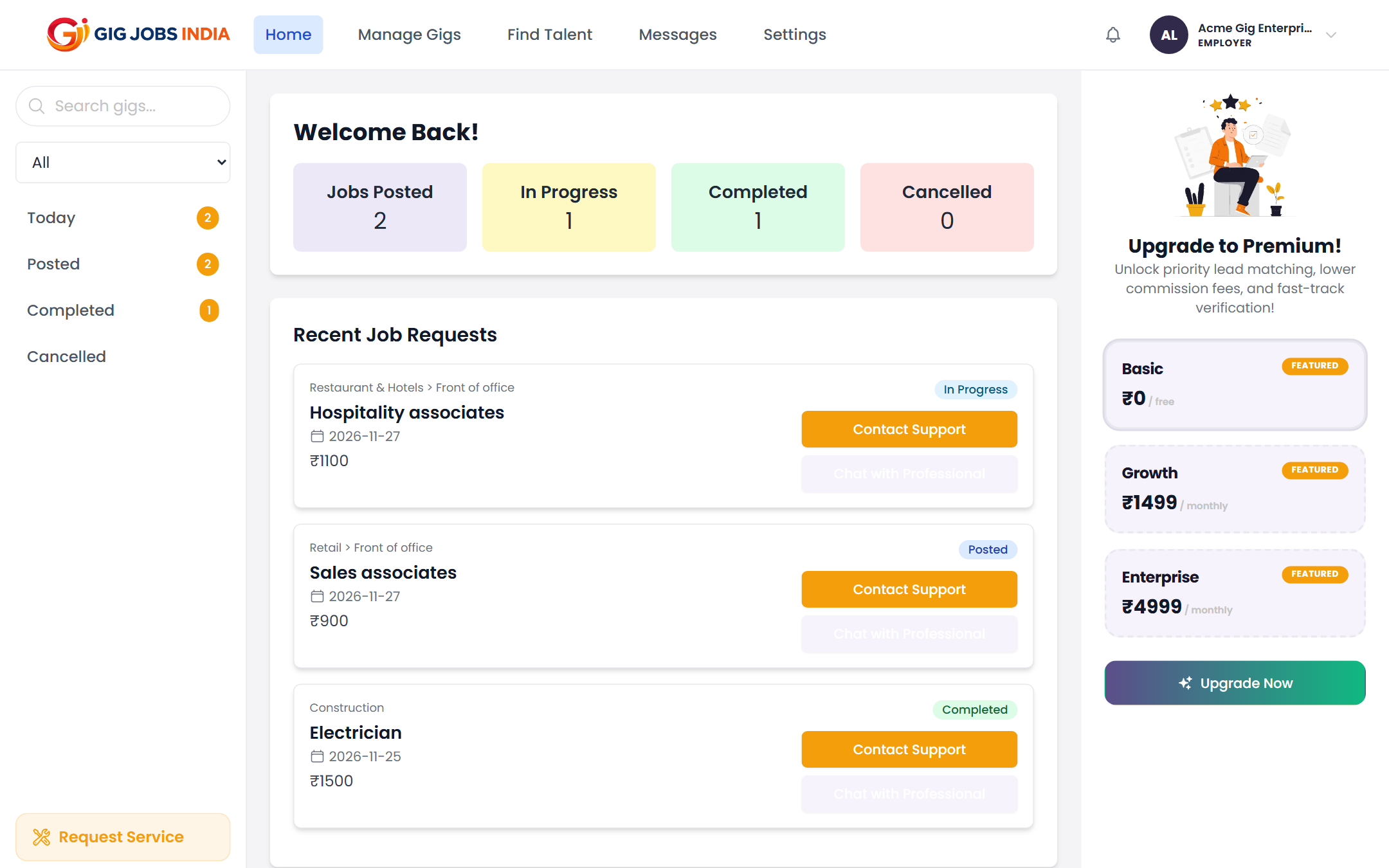
Figure 2.2 — Employer Command Dashboard (/employer/dashboard)
3-Step Request Service / Gig Creation Wizard
Creates single or multi-worker gig postings via App, Chat, Email, or Callback channels with automated lead-time & quiet-hour checks.
| # | User Action | UI Component / Control | Input / Validation Rule | Expected System Response |
|---|---|---|---|---|
| 1 | Step 1 (Method) — Select intake channel | RequestChannelCard ("App", "Chat", "Email", or "Call") -> "Continue ->" | Select "App" for direct structured web posting | Advances stepper pill from Method to Details. |
| 2 | Step 2 (Details) — Configure category, urgency, schedule & budget | CategoryTreeSelect, Urgency dropdown, Date/Time, Headcount, Price & Address | Urgency validates lead notice (4h Immediate, 12h Same day, 24h Next day, 48h Flexible) | Validates quiet hours (22:00–06:00) and saved locations before advancing to Review. |
| 3 | Step 3 (Review) — Confirm summary & publish gig | ReviewSectionCard -> Submit & Publish CTA | Creates draft request -> invokes POST /api/requests/[id]/submit | Creates corresponding public job listing on /jobs and appears under /manage-gigs/posted. |
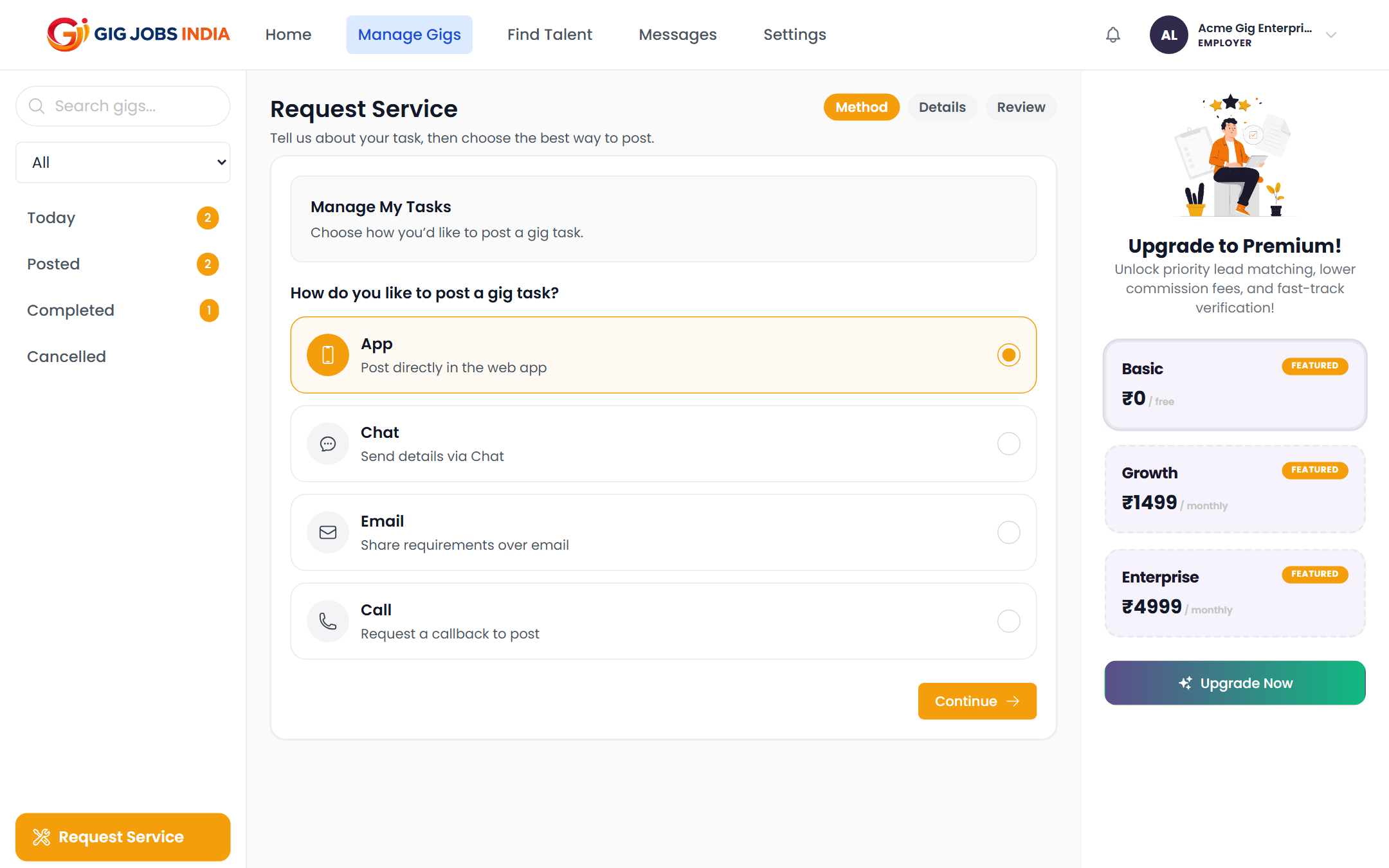
Figure 2.3 — 3-Step Request Service Wizard (/manage-gigs/request-service)
Applicant Screening, PII-Safe Review & Approve/Reject
Reviews HiringProgress bars, opens applicant profiles (/profile/[id]), and Approves or Rejects candidates cleanly.
| # | User Action | UI Component / Control | Input / Validation Rule | Expected System Response |
|---|---|---|---|---|
| 1 | Inspect posted gigs and applicant counts | Left Nav -> "Posted" (/manage-gigs/posted) | Click GigCard -> "View Details" | Opens DetailedGigCard showing HiringProgress (Selected vs Required Professionals) and Applied Professionals list. |
| 2 | Open applicant profile & review summary | Click candidate row -> routes to /profile/[applicantUserId] | Shows EmployeeProfileCard, skills, KYC badge, and rating summary | Masks sensitive phone/email PII until approval while allowing interview messaging. |
| 3 | Approve or Reject applicant | "Approve" or "Reject" CTA on Applicant Profile / Card | Selecting Approve updates applicationStatus to approved | Decrements remaining slots, unlocks real-time Chat thread, and provisions onsite Attendance OTP. |
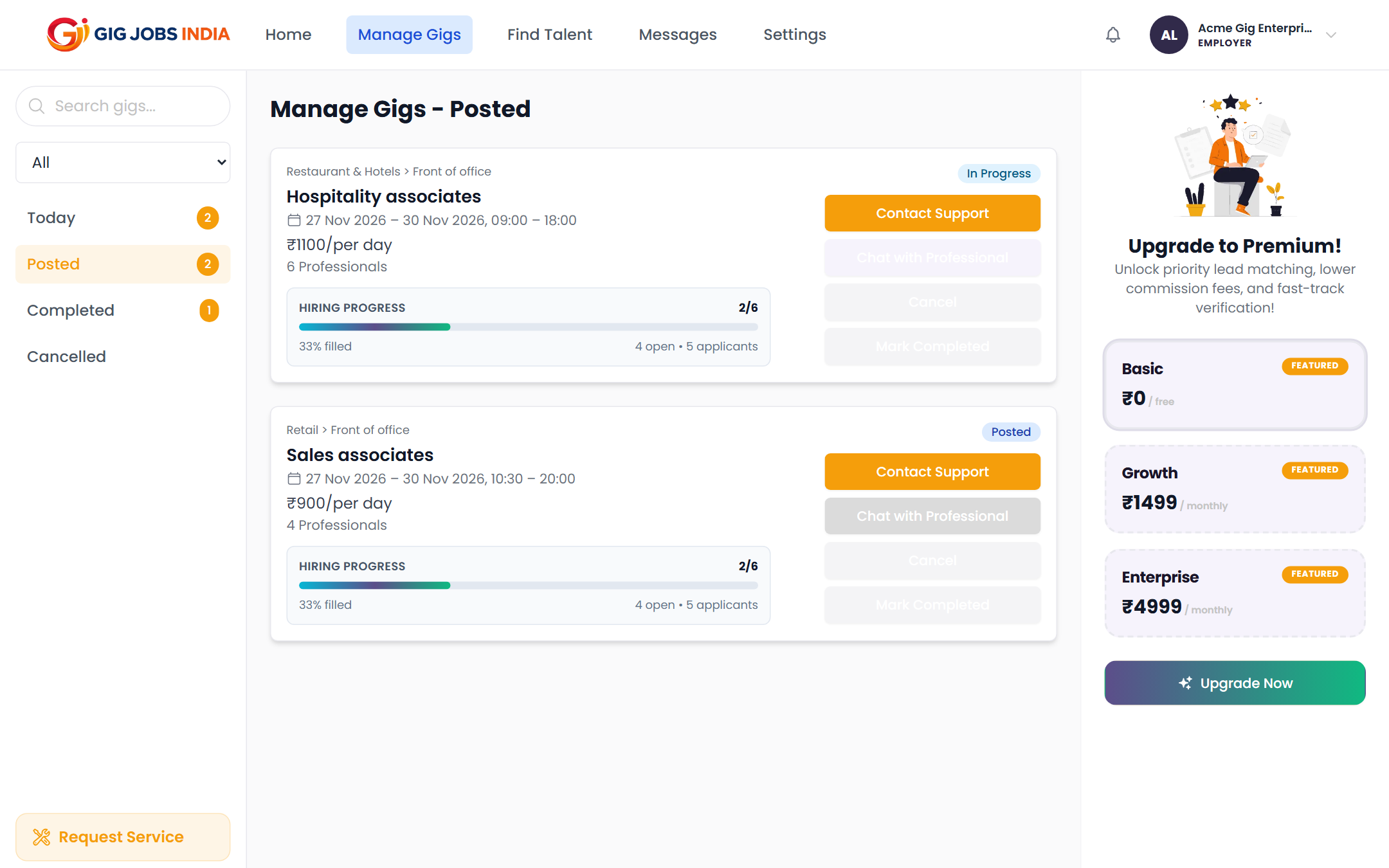
Figure 2.4 — Employer Posted Gigs & Applicant Screening (/manage-gigs/posted)
Timesheet Approval, Mark Completed & 1–10 Star Review
Audits logged shift hours, triggers escrow payout settlement, and submits normalized JobReview ratings on a 1–10 scale.
| # | User Action | UI Component / Control | Input / Validation Rule | Expected System Response |
|---|---|---|---|---|
| 1 | Review completed timesheet insights | /manage-gigs/completed -> AttendanceInsightsCard | Verify Check-In/Check-Out timestamps and duration | Clicking "Approve & Release Payment" posts POST /api/jobs/[id]/attendance/check-out and credits candidate wallet. |
| 2 | Submit 1–10 Star Experience Rating | "Rate" CTA -> /ReviewRating?jobId=... | Select 1 to 10 stars + Detailed Feedback -> "Submit Review" | Dispatches POST /api/jobs/reviews (ARC-02) and notifies candidate via chat thread. |
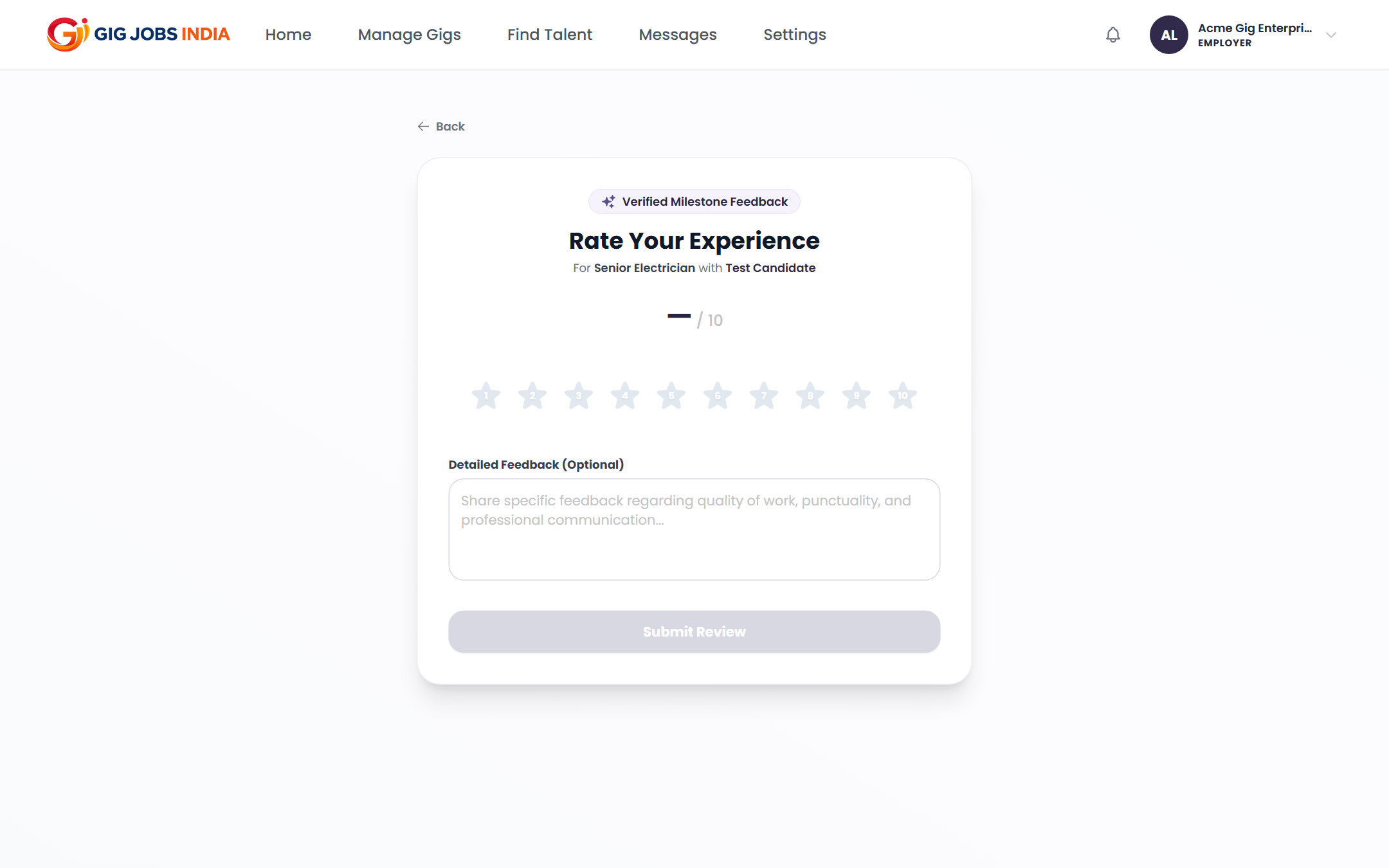
Figure 2.5 — 1-to-10 Star Rating & Milestone Feedback Screen (/ReviewRating)